- Softonic Rating:
- Good:7/10
- License:
- Free
- Added:
- December 12, 2007
- Publisher:
- Website
- File size:
- 253 KB
- Downloads:
- 271
- DownloadFree
“Tag songs in iTunes according to your mood”
by Elena Santos
Some days you feel like listening to the most hardcore music in your playlist, but some other days you may just want to listen to some peaceful songs.
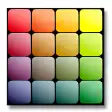
With Moody, you'll be able to adjust your playlist to those different states of mind and create song selections accordingly. The program, which works as a plug-in for iTunes, displays a small interface with a color chart where you only need to click on the color that better represents the feelings you experience with any given song.
Then, based on this color categorization, the program creates iTunes playlists that suit different moods: happiness, melancholy, sadness, etc. Plus, you can use it to manage iTunes controls (play, stop, previous and next track) from its interface.
Moody works generally fine. Just remember to run iTunes before launching it. Also, I missed having some kind of message when I click a color that doesn't have any song linked to it yet.
With Moody you can easily create iTunes playlists that fit your particular mood on different days.

Languages:
English
OS requirements for Moody:
- OS: Win98/98SE/Me/2000/XP
Minimum requirements:
- iTunes
- Easy, fast method to tag songs
- Creates mood-based lists automatically
- Doesn't warn the user if there's no song linked to a given color
From the publisher of Moody
Moody is your buddy when you don't know exactly what you want to listen to. The times you would like to tell iTunes to just play me something soft. Or get this party started. You can play a shuffle from a genre, but a good mix is really more about energy than genre. With Moody you get streamlined shuffles in whatever mood you like.
If one mood isn't enough, take two or three. Mix and match colors as you like. And as your day goes by, let the music's mood follow your own.
Since Moody works with iTunes your tags stays in the files of the songs, and in the iTunes database. You are not limited to use your tags with Moody, or with iTunes.
More Moody screenshots
Posts about Moody in our blog
- Add mood tags to your music with Moody by Cyril Roger
- Magic Academy is simply spellbinding by James Thornton
Sponsored Links
Programs similar to Moody
Moody options
Moody in other platforms
- Moody (Mac)
Your opinion is important!